

Download Skype (Classic) – free calls, video calls, conference calls, file sharing, screen sharing, secure communication, international calling, P2P technology, end-to-end encryption
Overview
Skype (Classic) is a widely recognized communication platform designed to connect users across the globe through voice, video, and messaging services. The app enables free calls between Skype users regardless of geographical location, leveraging peer-to-peer (P2P) technology to maintain high-quality connections. This makes it a practical solution for individuals seeking cost-effective ways to stay in touch with friends, family, and colleagues.
For professionals, the app supports remote collaboration through features like conference calling and screen sharing, enhancing productivity in distributed teams. The target audience includes both personal users and business professionals who rely on consistent, secure, and high-performance communication tools. The developer, Skype, has a long-standing reputation in the digital communication space, contributing to the app’s reliability and widespread adoption.
Real-world use cases range from virtual family gatherings and remote job interviews to international business meetings and technical support sessions. In the broader app ecosystem, Skype (Classic) remains a foundational tool for cross-platform communication, offering a stable and feature-rich environment for users across multiple devices. Its integration of end-to-end encryption strengthens its position as a secure choice for sensitive conversations.
Key Features & Functionality
- Free Voice and Video Calls: Users can make unlimited free calls to other Skype users, with video calling available when both parties have webcams. This feature supports personal and professional interactions without cost, reducing communication barriers across regions.
- SkypeOut Calling: This functionality allows users to call landlines and mobile phones worldwide at competitive rates, making it ideal for maintaining contact with individuals who do not use Skype.
- Conference Calling: The app supports group calls with multiple participants, enabling virtual meetings for teams, educational sessions, or family coordination across time zones.
- Secure File Transferring: Users can send files directly within the app with encryption in transit, ensuring privacy and reducing the risk of data exposure during sharing.
- Screen Sharing: This feature allows real-time screen sharing during calls, which is valuable for remote assistance, collaborative work, and presenting content during meetings.
- End-to-End Encryption: All voice, video, and message transmissions are secured using end-to-end encryption, protecting conversations from unauthorized access and ensuring confidentiality.
These features collectively address common communication challenges such as high international calling costs, poor call quality, and insecure file sharing. For example, a remote worker can conduct a secure team meeting using video, screen sharing, and encrypted file transfers—all within a single interface. Similarly, a student studying abroad can maintain low-cost video contact with family back home through free calls and SkypeOut options.
Interface, UX & Performance
The user interface of Skype (Classic) is designed with clarity and functionality in mind, featuring a clean layout that organizes contacts, messages, calls, and settings in an intuitive manner. Navigation is straightforward, with a sidebar for quick access to recent conversations, a main chat window, and a call control panel. The visual style is minimalistic, prioritizing usability over decorative elements.
Users can easily switch between voice, video, and screen-sharing modes during a call, with on-screen indicators for active participants and connection status. Although the developer did not list formal performance metrics, the app is known for maintaining stable connections across various network conditions. Responsiveness is generally strong, with minimal lag during calls and quick load times for messages and file transfers.
Stability across different device categories—ranging from desktops to mobile devices—is consistent, though specific performance data was not disclosed. The app functions well on both low-end and high-end hardware, suggesting efficient resource management. Compatibility with multiple operating systems further enhances its usability across diverse environments.
Overall, the UX supports seamless interaction, minimizing the learning curve for new users.
Platform Compatibility & Technical Requirements
Skype (Classic) is available on multiple platforms, including Windows, macOS, Linux, Android, and iOS, ensuring broad accessibility across personal and professional environments. The current version is 8.106.0.126, with a file size of 143.5 MB. The developer did not specify minimum OS requirements, nor did they provide detailed compatibility information for specific device models or hardware configurations.
While the app is designed to run on a wide range of systems, users are advised to ensure their device meets general system standards for the respective operating system. No additional software dependencies were mentioned. The app’s cross-platform availability allows users to switch between devices without losing conversation history or settings, supporting a consistent experience across environments.
The absence of detailed technical specifications does not detract from its usability, as the app functions reliably on standard modern devices.
Pros and Cons
Pros
- Free voice and video calls between Skype users worldwide
- Supports international calling via SkypeOut at affordable rates
- End-to-end encryption ensures secure communication
- Integrated screen sharing and file transfer capabilities
- Available on multiple platforms including desktop and mobile
- Stable performance across various network conditions
Cons
- Some advanced features may require a subscription or additional payment
- Limited customization options in the interface
- Occasional delays in message delivery on unstable networks
- Developer did not provide detailed system requirements
- Outdated design elements may appear less modern compared to newer apps
FAQ
Is Skype (Classic) free to download and use?
Yes, Skype (Classic) is available at no cost. Users can make free calls to other Skype users and access core features without charge. Some premium services, such as calling non-Skype numbers, may require credits or subscriptions.
Can I use Skype (Classic) on both Android and iOS devices?
Yes, the app is available for both Android and iOS platforms. Users can install it from their respective app stores and synchronize their accounts across devices.
Is my data secure when using Skype (Classic)?
Yes, Skype (Classic) uses end-to-end encryption for voice calls, video calls, and messages, ensuring that only the communicating parties can access the content. This protects conversations from interception and unauthorized access.
How do I update Skype (Classic) to the latest version?
Updates are typically delivered automatically through the app store or the official website. Users should ensure their device’s operating system and app store are up to date to receive the latest version.
What should I do if I can’t make video calls?
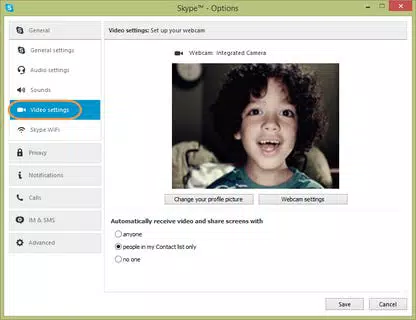
Ensure that your device has a working webcam and microphone. Check your internet connection and verify that the app has permission to access camera and microphone hardware. Restarting the app or device may also resolve temporary issues.
Final Thoughts
Skype (Classic) remains a powerful and versatile communication tool that delivers on its promise of seamless, secure, and cost-effective connectivity. With its free calling, end-to-end encryption, and robust collaboration features, it continues to serve individuals and teams across the globe. The app’s cross-platform availability and consistent performance make it a reliable choice for both personal and professional use.
While some design elements may feel dated and certain advanced features are not included in the free version, the core functionality remains strong and accessible. For anyone seeking a dependable way to stay in touch—whether through video calls, file sharing, or international calling—Skype (Classic) offers unmatched value. Download Skype (Classic) now and experience secure, high-quality communication on any device.


